Products — UniCNC · Early access

Machine control for the shop floor⁠—free.

A free alternative to Mach3, Mach4 and MachPro.

Readable from across the shop, sized for gloved hands, and built so nothing moves by accident. Windows, macOS, Linux and Raspberry Pi.

  • No license key
  • Offline. No account.
  • Mac · Windows · Linux · Pi
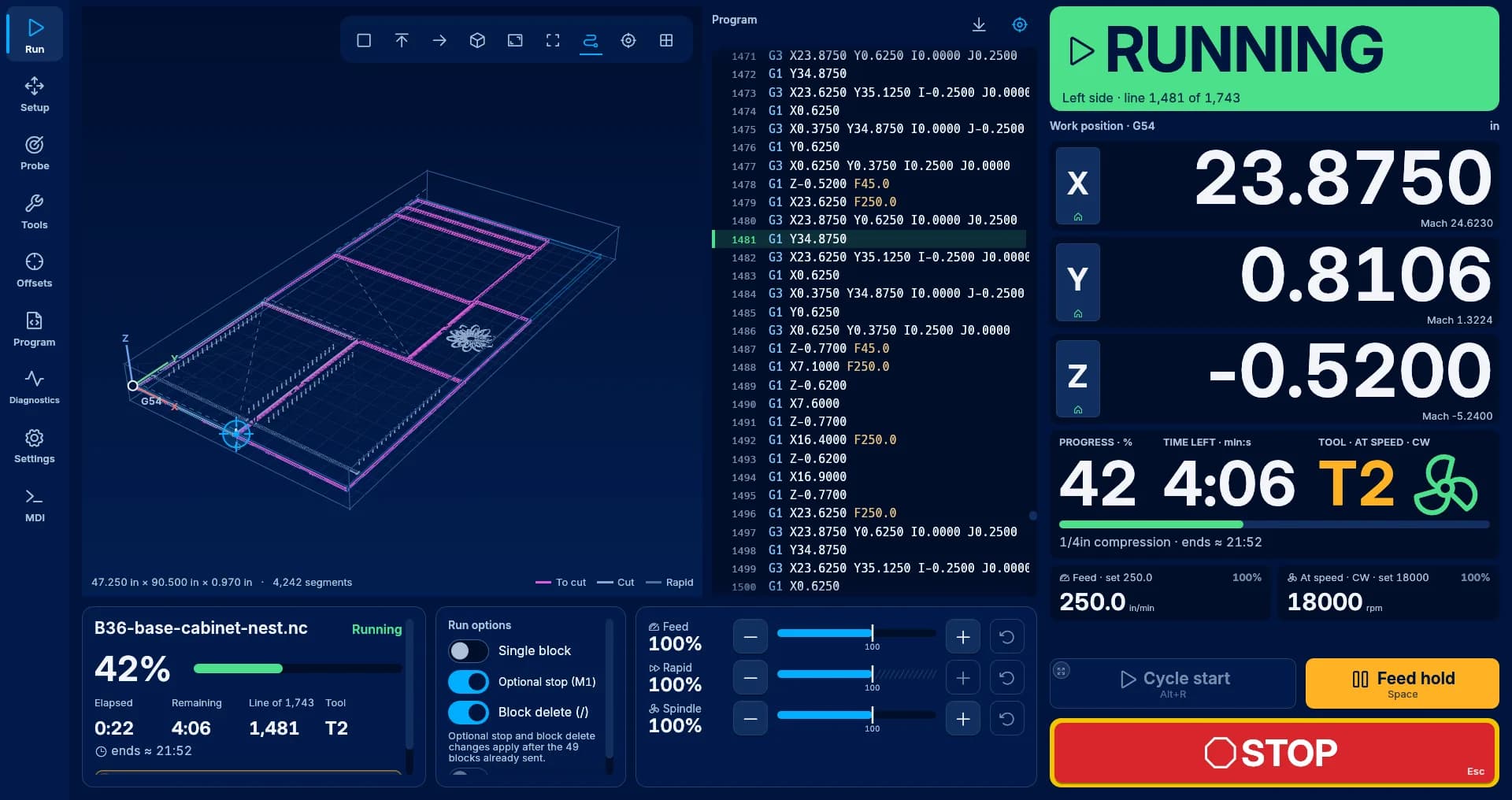
The UniCNC run screen mid-job: a large RUNNING state, the position readout, a 3D toolpath of a cabinet nest, and the STOP and Feed hold keys.
The run screen mid-job.

Parts aren't ruined by the cut.

They're ruined by the tap you didn't mean. So Cycle start, homing and go-to moves wait for a deliberate hold, and jog keys move only while you touch them.

// hold to start

Nothing moves until you mean it

Cycle start, homing and go-to moves wait for a deliberate hold, and jog keys move only while you touch them. Try it: hold Cycle start. Let go early and nothing happens.

0.6 sHold to start
Cycle start, homing and go-to moves complete only after a deliberate hold.
1.0 sFor the riskiest actions
Unlocking the machine without homing takes a longer hold, and the key names the action.
3 sTwo-step, if you'd rather tap
Tap to arm, then confirm within three seconds. Same result, no holding.
No holdSTOP and Feed hold
On every screen, and they act the instant you touch them.

Ready

pocket.nc · G54 · in · 0%

X
3.0000
Y
1.8750
Z
0.2500

Hold Cycle start for 0.6 s. Let go early and nothing moves.

Hold Space or Enter to start. Escape stops.

// the run screen

Readable at two meters

Progress, time left, the tool and the machine state are sized to read from the far side of the table⁠—no walking over to check where the job is.

  • Every machine state has its own icon and word, never color alone
  • Keys sized for gloved hands, with STOP and Feed hold on every screen
  • Dark, light and high-contrast themes, plus a kiosk mode for a dedicated shop PC
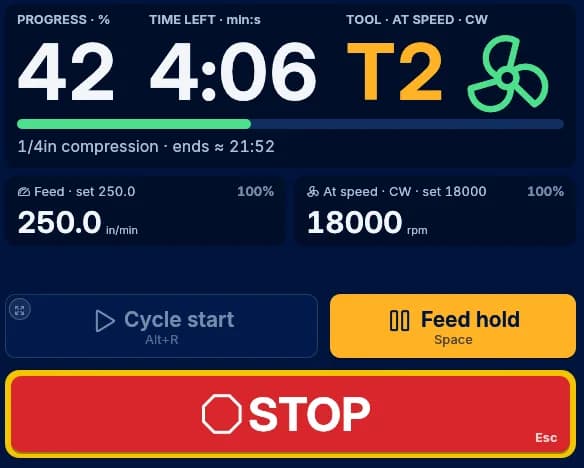
The UniCNC controls during a run: 42 percent done, 4:06 left, tool T2 at speed, the feed and spindle readouts, and the Cycle start, Feed hold and STOP keys.
The deck during a run.

// guided M6

Tool changes that walk you through it

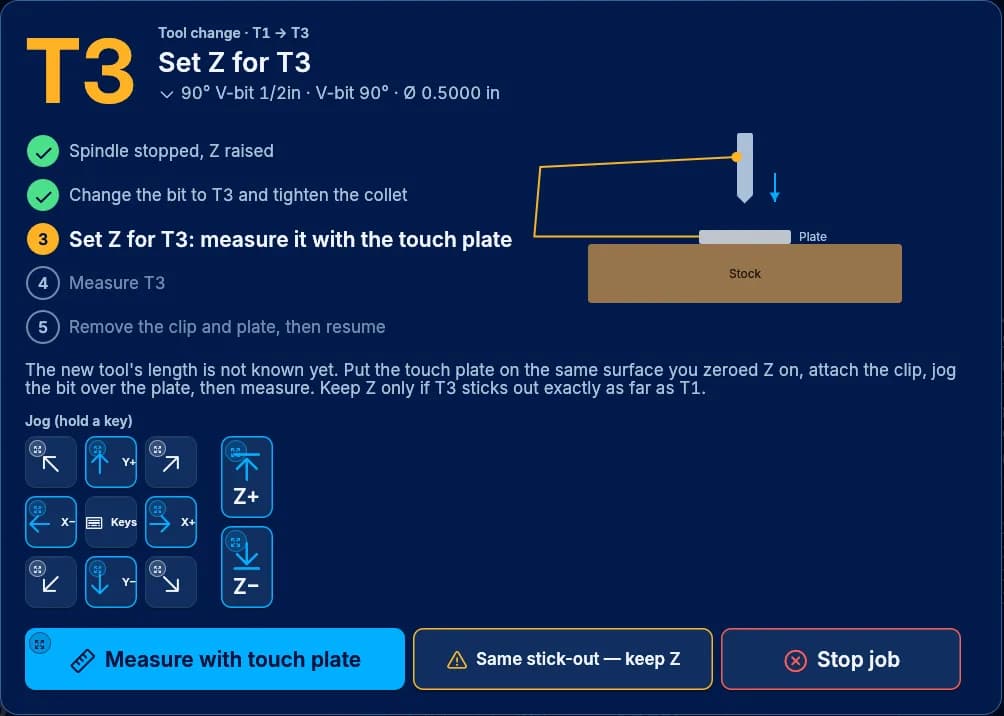
When the program calls M6, UniCNC stops the spindle, raises Z and lists each step: change the bit, measure it on the touch plate, carry on. The job waits for you.

  • Measure the new tool on the touch plate, or keep Z when the stick-out matches
  • Jog keys right inside the step, so you never leave the screen
  • STOP and Feed hold stay live on top of it
The guided tool change to T3: spindle stopped and Z raised, bit changed, now measuring with the touch plate, with jog keys and a diagram of the plate on the stock.
Guided tool change, step 3 of 5.

// no CAM needed

Make parts without opening CAM

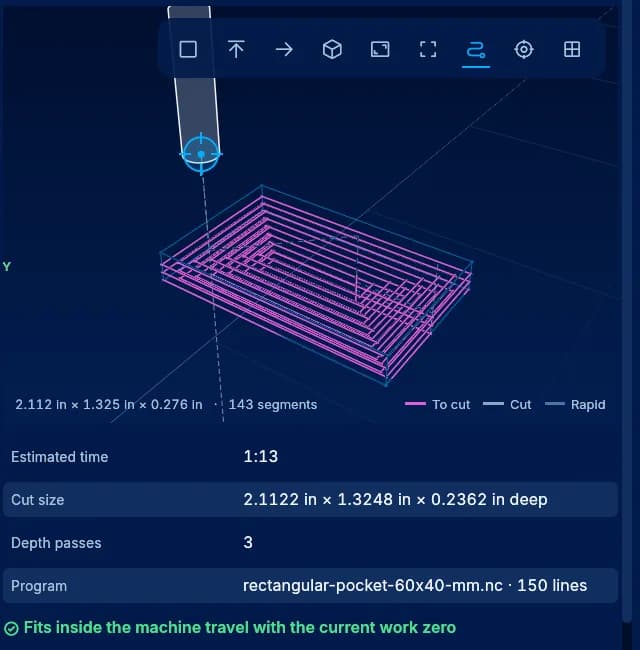
Surfacing, facing, pockets, profiles and drill patterns come straight from a form. Each one shows its toolpath, its time and whether it fits the machine travel from your work zero⁠—before you load it.

  • Rectangle and circle pockets, profiles, drill grids and bolt circles
  • Estimated time and depth passes before you commit
  • A travel check against your current work zero
The rectangle pocket generator: a 3D preview of the pocket passes, an estimated time of 1:13, three depth passes, and a check that it fits inside the machine travel.
A rectangle pocket, previewed before it is loaded.

// probing + height map

Probe once. Cut true.

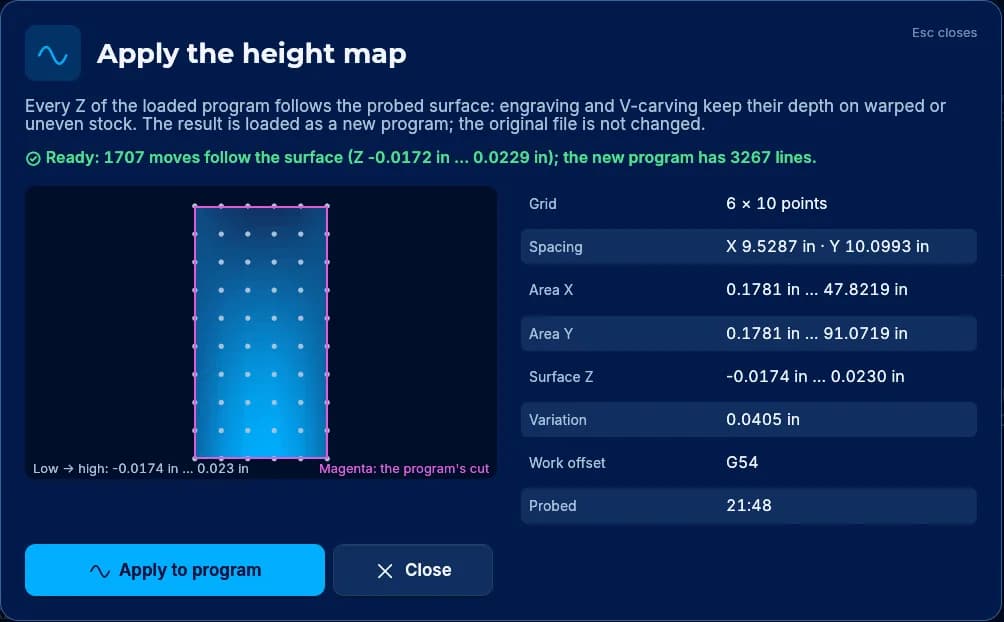
Probe Z, a corner, an edge or a center, then probe a grid across warped stock. The height map bends every Z in the program to follow the surface, so engraving and V-carving hold their depth.

  • Z touch plate, XYZ corner, edge, and bore or boss center
  • The original file is never changed⁠—the warped program loads as a new one
Applying a height map: a 6 by 10 probe grid over the stock, the measured surface variation, and a note that 1,707 moves now follow the surface in a new program.
A height map applied to a cabinet-nest program.

// also in early access

The rest of a working shop

The things you reach for every day, without hunting for a plugin.

Mach-dialect G-code + Macro B
RS274NGC with the Mach dialect and Fanuc Macro B, built to read the programs Mach post-processors write.
248 extended work offsets
G54 through G59.3, plus 248 more for fixtures, jigs and multi-part nests.
Job queue + power-loss recovery
Queue programs with run counts and keep a history. Jobs checkpoint as they run, so after a power cut UniCNC knows where the job stopped.
Rhai macros on M100–M999
Write your own M-codes in a small scripting language, with any compile error listed by file and line.
Offline, no account
Runs with no internet connection, no sign-in and no telemetry.
Three themes
Dark for the shop, light for a bright room, high contrast for glare and tired eyes.

// switching

Coming from Mach3 or Mach4?

Your setup comes with you. A few habits change—here is exactly which ones.

What carries over

  • Your machine profile: a Mach3 profile XML or a Mach4 Machine.ini imports
  • Programs posted for Mach from VCarve, Aspire or Fusion 360 are what the Mach dialect is built to read; early access is where we confirm it on your files
  • Fanuc Macro B programs

What changes

  • M6 becomes a guided tool change instead of a macro you maintain
  • Lua and Mach macros are rewritten in Rhai, with any compile error listed by file and line
  • Tool tables come over as CSV rather than importing from Mach directly
  • Cycle start, homing and go-to moves ask for a 0.6 s hold, or a two-step confirm if you prefer
  • grblHAL and FluidNC connect over the network today; USB serial, including Grbl 1.1, is in development

Switching soon?

Get on the list and tell us your setup. Owners of grblHAL and FluidNC machines are invited first, then ESS owners as that support lands.

// compatibility

What it runs with today

Every controller, pendant and computer, with where it stands. Rows move to early access as they are ready—not before.

Controllers

  • grblHALEarly accessOver the network (Ethernet)
  • FluidNCEarly accessOver the network
  • Grbl 1.1In developmentUSB serial
  • grblHAL and FluidNC over USBIn developmentUSB serial
  • Warp9 Ethernet SmoothStepper (ESS)In developmentEthernet

Pendants

  • XHC WHB04BIn developmentWireless, USB receiver

Computers

  • Windows 10 and 11Early accessx86-64
  • macOS 12 or laterEarly accessApple silicon and IntelBuilds aren't notarized yet, so macOS asks you to confirm the first launch.
  • LinuxEarly accessx86-64 and ARM64
  • Raspberry Pi 5Early accessRaspberry Pi OS, 64‑bit
  • Raspberry Pi 4, 4 GB or moreEarly accessRaspberry Pi OS, 64‑bitSuited to 2D jobs.

// for integrators

Automate it⁠—when you turn it on

An HTTP and WebSocket API reads machine state and sends commands. It is off by default, and listens only on that computer until you change it.

  • Off until you enable it

    Local-only by default. Opening it to the shop network requires a token.

  • Axis moves need a held dead-man

    Axis moves from a script need a held dead-man; when it lapses, jogs, moves and jobs stop. The remote API is still in safety review, so keep it off on a machine doing real work for now.

  • STOP is never gated

    Stop, Feed hold and reset are accepted from any client, at any time.

  • OpenAPI + a Python client

    The contract is published as OpenAPI, with an example client in plain Python.

Python
from unicnc_client import UniCNC
m = UniCNC("http://127.0.0.1:8089", client="cell-1")
m.connect()
with m.hold():  # axis moves stop if this lapses
    m.home()
    m.wait_idle()
The example client keeps the dead-man held while the block runs.

// spec sheet

The short version

Price
Free. No license key, no account.
Axes
Up to 6, as your controller allows
Work offsets
G54–G59.3, plus 248 extended
G-code
RS274NGC · Mach dialect · Fanuc Macro B
Macros
Rhai, on M100–M999
Hold to start
0.6 s · 1.0 s for the riskiest actions
Two-step confirm
Arm, then confirm within 3 s
Controllers
grblHAL · FluidNC, over the network
Computers
Windows 10/11 · macOS 12+ · Linux · Raspberry Pi OS 64‑bit
Themes
Dark · light · high contrast · kiosk mode
Remote API
HTTP + WebSocket, off by default
Internet
Not required
Telemetry
None

// road to 1.0

Early access, then proof, then 1.0

Machine control should earn every label it wears. This is what stands between today and 1.0, in order.

  1. 1

    Early accessNow

    Invites start soon, in waves: the full app with grblHAL and FluidNC over the network, shaped by your reports.

  2. 2

    Public beta + hardware validationUnder way

    Real cuts on an Avid CNC PRO4896, with an operator at the E-stop.

  3. 3

    Independent sign-off

    Architecture, safety, UX and QA reviews signed off by people who didn't write the code.

  4. 4

    1.0

    Released when the three steps before it are done—not on a date.

// why free

Why is it free?

UniCNC is built by UniCorp, a software company in Missoula, Montana. The same team builds Custom Operating Platforms⁠—business software shaped around how a company actually runs.

A license key, a seat count or an account doesn't make a machine cut better or stop sooner. So UniCNC has none of them: install it on the shop PC and the laptop in the office.

See Custom Operating Platforms 

Free. No license key, no account.

UniCNC by UniCorp · Windows · macOS · Linux · Raspberry Pi OS

UniCNC questions

Is UniCNC really free?

Yes. No license fee, no license key, no account, and no license tied to one PC. Install it on the shop computer and the laptop in the office.

Can I run production work during early access?

Hardware validation is under way on a real machine now. Until it's complete, air-cut each new job first and stay at the machine with your hand near the E-stop.

Does the STOP key replace my E-stop?

No. A software STOP is not an emergency stop. Keep a hardware E-stop that cuts power to the motion system, wired and within reach, every time the machine runs.

Will it run my Mach3 or Mach4 setup?

Your Mach3 profile XML or Mach4 Machine.ini imports. Programs posted for Mach from VCarve, Aspire or Fusion 360 are what the Mach dialect is built to read; early access is where we confirm it on your files. Lua and Mach macros don't carry over—you rewrite them in Rhai. Tool tables come over as CSV.

Will it run my Avid CNC?

Not on its SmoothStepper (ESS) yet — that support is in development. Today UniCNC connects to grblHAL and FluidNC controllers.

Which controllers does it work with?

grblHAL and FluidNC over the network. USB serial connections, including Grbl 1.1, are in development. The compatibility table on this page lists every controller and where it stands.

See the compatibility table 
Does it run on a Mac or a Raspberry Pi?

Yes: macOS 12 or later on Apple silicon or Intel, and Raspberry Pi OS 64-bit on a Pi 5, or a Pi 4 with 4 GB or more for 2D jobs. Early-access Mac builds aren't notarized yet, so macOS asks you to confirm the first launch.

Does it phone home?

No. UniCNC works offline, needs no account and sends no telemetry. The remote API is off until you turn it on, and then listens only on that computer unless you open it up.

Who supports it?

UniCorp, the team that builds it. Early-access testers report problems straight to us, and a person reads every report. Questions before your invite arrives? Send us a message.

Send a message 
Can I automate it?

Yes. An HTTP and WebSocket API, off by default, reads machine state and sends commands, with an OpenAPI contract and an example Python client. Axis moves from a script need a held dead-man; when it lapses, jogs, moves and jobs stop. The remote API is still in safety review, so keep it off on a machine doing real work for now.

Be in the first wave.

Invites start soon. Leave your email⁠—and your setup, if you like⁠—and we'll tell you when yours is ready.